
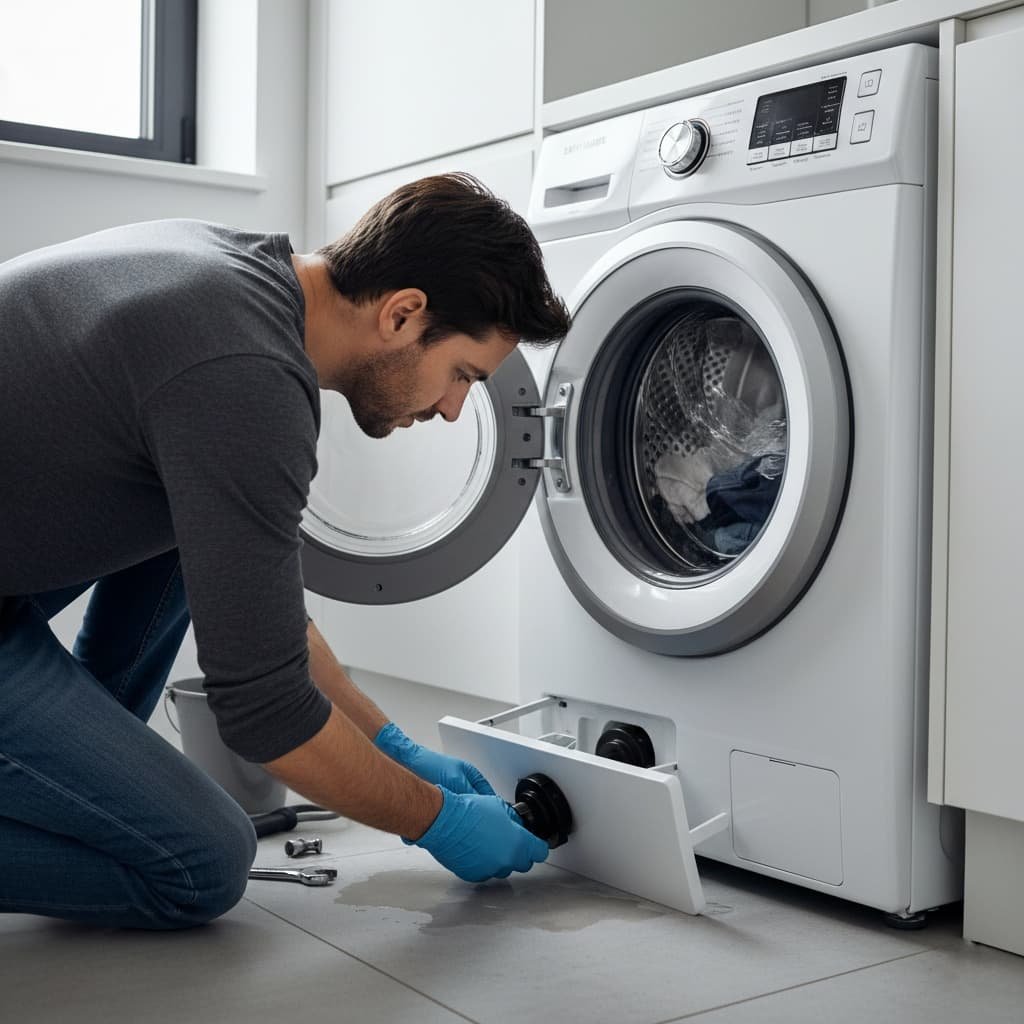
Water sitting in the drum after a finished cycle isn’t a mystery fault; it’s one of five specific things, and three of them you can fix in under fifteen minutes without calling anyone. The trick is figuring out which one you’re actually dealing with before you start taking anything apart. In this guide, we discuss how to fix the Samsung washer drain issue.
Table of Contents
Why Washing Machine Drainage Fails
Water fails to drain when the flow through the hose or pump is blocked or when an electrical fault stops the pump from engaging at all. Common causes include clogs, kinks, foreign objects, faulty door switches, and load imbalance severe enough to trigger a safety stop before drainage completes.
Drainage and pump-related issues are consistently among the most common reasons Samsung washers need repair, though the exact share varies by source and model year, treat any specific percentage you see elsewhere as a general estimate rather than a confirmed figure.
Many current Samsung washers with SmartThings connectivity can flag a drain-related fault through the app before you ever open the filter panel, which is worth checking first if your model supports it, since it can confirm whether the pump itself is receiving power before you start disassembling anything.
Sometimes drainage issues are linked to the spin cycle instead of drainage itself. If your machine drains but then gets stuck before spinning, that’s a separate mechanical pattern.
👉 [Samsung Washing Machine Not Spinning, 7-Minute Stall Fix] covers that specific pattern if drainage completes but spin doesn’t follow.
⚠️ Safety Before You Start
- Unplug the washer at the wall outlet before opening the filter panel, accessing the pump, or handling the emergency drain hose; don’t rely on pausing the cycle alone.
- Have towels and a shallow tray ready before releasing any water; a full drum can hold several gallons, and water near an outlet is an electrical hazard, so keep the drain path clear of any nearby power strips or outlets.
- Wear gloves when reaching into the pump housing, the impeller has sharp edges, and trapped items like coins, pins, or broken hangers are a common cause of cuts during this exact repair.
- Never force a jammed impeller with excessive pressure, if it doesn’t turn freely by hand after debris is cleared, that’s a sign of a deeper mechanical issue, not something to push through.
- Stop and call a licensed technician if the issue traces back to the motor, control board, or any internal wiring, electrical diagnosis and board-level repair go beyond a DIY drain fix and risk further damage if attempted without the right equipment.
Step-by-Step: Drain Your Samsung Washer Manually
If your Samsung washer is full of water, follow these safe steps to drain it.
- Unplug the machine. Always disconnect the power before working on the washer.
- Locate the drain filter. On most Samsung front-load washers, the filter sits behind a small access panel at the bottom right. On top-load models, the filter access is typically absent, and drainage issues more often point directly to the pump or hose instead.
- Place towels and a shallow tray to catch the water you release from the filter or emergency drain hose.
- Use the emergency drain hose. Pull out the small hose and slowly remove the cap to let water flow into the tray.
- Remove and clean the filter. Unscrew the filter, remove lint and debris, then rinse under running water.
- Inspect the hose and pump area. Check for visible blockages or trapped objects where the hose connects to the pump.
After draining, run a short rinse and spin cycle to confirm normal drainage. If water still does not drain, continue with the deeper checks below.

Common Causes and Safe Solutions

- Clogged Drain Pump: A clogged pump is the most frequent cause of drainage failure. Coins, hair, and lint can jam the impeller. This is also the cheapest and fastest fix of everything on this list, which is exactly why an experienced technician checks it first before considering anything else; it takes minutes to rule out and resolves a large share of drain complaints on its own.
Solution: Access the pump after unplugging, remove debris with gloves, and test whether the impeller turns freely by hand. Replace the pump if the motor fails to engage even with the impeller clear.
- Kinked or Blocked Drain Hose: A twisted or pinched hose prevents water flow. Hoses can also become clogged with residue over time, particularly in households using powder detergent that doesn’t fully dissolve in cooler wash cycles.
Solution: Straighten the hose and detach it to check for obstructions. Replace severely damaged or cracked hoses rather than attempting a temporary patch.

- Faulty Door or Lid Switch: Many Samsung washers will not drain if the door sensor believes the door is open, since the control board treats an unconfirmed door-closed state as a safety interlock and halts the cycle before draining.
Solution: Clean the latch area and test the switch. Replace the switch if it does not register closure even after cleaning.
Here’s a detail worth knowing before assuming the pump is at fault: a washer that stops mid-cycle with the door lock light flashing is very often a door switch issue rather than a drainage failure at all, the two get confused constantly because both result in a machine that appears “stuck” with water still inside.
- Drain Filter Blockage: Filter buildup slows drainage, and the washer often signals an error code before stopping entirely rather than failing silently.
Solution: Clean the filter monthly to avoid blockages. Rinse it and reinstall securely, checking that the seal isn’t cracked before closing the access panel.
- Electrical or Motor Issues: If the pump motor does not start after the checks above, the motor or control board itself may be faulty.
Solution: At this stage, contact Samsung support or a qualified technician for safe diagnosis and repair, this is the point where DIY troubleshooting reaches its practical limit.
Comparing the Causes: Symptoms and DIY Difficulty
| Cause | Typical Symptom | DIY Difficulty | Common Trigger |
| Clogged drain pump | Water sits, faint humming or no sound | Easy | Coins, hair, small objects |
| Kinked/blocked hose | Slow drain or partial drain | Easy | Hose pinched behind unit |
| Faulty door/lid switch | The cycle halts, door lock light flashing | Moderate | Worn latch or sensor |
| Drain filter blockage | Slow drain, error code appears first | Easy | Lint and debris buildup |
| Motor/control board issue | Pump silent, no response at all | Requires technician | Electrical component failure |
Quick Diagnostic Checklist
- Is the washer powering on? If not, check the outlet and breaker
- Is there an error code? A code specific to draining narrows the cause significantly faster than starting with a full teardown
- Is the drain hose free and straight? Check behind the unit
- Is the filter clogged? Clean and retest
- Does the pump hum or make noise when running? A completely silent pump points toward the motor or control board rather than a simple clog
👉 [Samsung Washer Drain Error Codes Explained] is the faster path if a specific code appeared on the display, rather than working through the general checklist above from scratch.
Preventing Future Drain Problems
Cleaning the filter monthly, running an occasional maintenance wash, and avoiding overloading all reduce how often drainage issues come up in the first place.
👉 [Samsung Washer Maintenance Schedule, Drain and Pump Care Only] covers the full preventive routine in depth, including the maintenance wash and descaling schedule, since that’s a separate ongoing-care topic from the repair steps above.
When to Call a Professional
Call a technician if you encounter any of the following after DIY checks:
- The pump motor is silent and does not respond
- Repeated error codes persist after cleaning
- There are signs of electrical damage or burning smells
- Replacing filters and hoses does not restore drainage
If you rent or live in a small apartment, a small wet/dry vacuum is genuinely useful to have on hand for drainage emergencies; it clears standing water fast and reduces mold risk while you wait on a fix or a technician visit.
FAQ
1. Why does my Samsung washer stop mid-cycle with water still inside instead of draining?
This is most often a door/lid switch not confirming a closed state, a clogged pump, or a filter blockage; the control board halts the cycle as a safety measure rather than attempting to drain through a suspected fault.
2. Is it safe to keep running cycles if drainage is intermittent rather than a total failure?
Intermittent drainage often points to a partial clog that’s likely to worsen, so it’s better to address it now than to keep running cycles and risk the pump working harder against a growing blockage.
3. Does a full teardown always beat starting with the filter and hose?
No, checking the filter and hose first resolves the majority of drainage complaints, and a full pump or motor inspection is rarely necessary once those two simple checks are done properly.
4. Can I use dish soap or other alternatives if I run out of proper washer maintenance products?
Stick to detergent designed for your machine type; substitutes not formulated for HE or front-load washers can cause excess suds that interfere with drainage rather than helping it.
5. Why does my washer show an error code before the water even backs up?
Many drain-related faults are detected by the control board before the drum visibly overflows, which is actually useful; it gives you a head start on diagnosis before the mess of standing water becomes a bigger cleanup issue.
6. Is a completely silent pump always a motor failure?
Not always; check that the machine is receiving power and that nothing upstream (like a tripped breaker) is cutting power to the whole unit before assuming the pump motor itself has failed.
7. How often should I clean the drain filter to avoid this recurring?
Roughly once a month is a reasonable general guideline, though households doing frequent heavy-soil loads or with pets often need it more frequently since lint and debris accumulate faster in those conditions.
Final Word

A Samsung washer that won’t drain almost always comes down to one of five things, a clogged pump, a kinked hose, a faulty door switch, a blocked filter, or a genuine motor issue, and checking them in that order gets you to the real cause fastest. If you’ve worked through every step here and water still isn’t draining, that’s your signal to bring in a technician rather than keep troubleshooting blind